
If you're still running payroll by hand, you're playing with fire. It's a massive time sink, for starters, but it also leaves your business wide open to expensive compliance penalties. Think of good payroll software for small business less as a tool and more as a strategic partner—one that handles the mind-numbing calculations, gets your taxes right, and lets you get back to actually growing your company.
Why Manual Payroll Is Holding Your Business Back

When you only have one or two employees, handling payroll yourself seems manageable. A simple spreadsheet feels like the smart, cost-effective way to go. But as soon as you start to grow, that "simple" spreadsheet quickly morphs into a serious administrative headache.
Doing payroll manually is like trying to navigate rush-hour traffic in a new city using a folded paper map. You might get where you're going, but it's going to be slow, stressful, and you're bound to make a few wrong turns. You're stuck tracking every hour, wrestling with withholding calculations, and trying to keep up with tax laws that seem to change every other week.
The Hidden Costs of Doing It Yourself
The danger of manual payroll goes way beyond just losing a few hours. One tiny miscalculation or a single missed tax deadline can bring hefty fines from the IRS and state agencies. In fact, one of the most common mistakes is misclassifying an employee, a compliance landmine that good software helps you avoid entirely.
The true price of sticking with a manual system includes:
- Costly Errors: A single typo in a spreadsheet cell can mean underpaying an employee or miscalculating tax deposits, both of which can lead to penalties.
- Wasted Time: How many hours do you spend each month just double-checking numbers and cutting checks? That's time you could be spending on sales, customer service, or new product ideas.
- Compliance Headaches: Federal, state, and even local tax rules are constantly in flux. Staying on top of it all without a system doing the heavy lifting is practically a full-time job.
- Reduced Employee Trust: Nothing erodes team morale faster than inconsistent or incorrect paychecks. It damages the trust your people have in the business.
By automating these critical tasks, payroll software turns a high-risk, time-draining chore into a smooth, reliable process. It becomes your compliance co-pilot, ensuring you're on the right track with every single payroll run.
Ultimately, ditching the spreadsheets is one of the smartest investments you can make. It's not just about efficiency; it's about protecting your business, reclaiming your time, and building a more professional operation. If you're just getting started, learning how to do payroll for small business the right way from day one will save you countless headaches down the road.
What Core Features Do You Actually Need?
When you start shopping for payroll software for small business, the sheer number of options can feel like you're staring at a wall of buttons. Every provider throws a long list of features at you, and it’s tough to tell what’s essential and what’s just noise.
The best way to cut through the confusion is to focus on the non-negotiables—the core engine that will keep your payroll running smoothly and, most importantly, legally. You're looking for a system that takes the most critical, time-consuming, and riskiest tasks off your plate. These aren't just nice-to-haves; they're foundational to protecting your business and winning back your time.
Let's break down the must-have features that should be on every small business owner's checklist.
Automated Tax Calculations and Filings
If there’s one feature that’s absolutely non-negotiable, this is it. Manually calculating federal, state, and local payroll taxes is a minefield. Tax laws change constantly, withholding rates vary from one town to the next, and one small mistake can lead to hefty penalties from the IRS.
Good payroll software is your built-in compliance expert. It automatically figures out the correct withholdings for every employee—including Social Security, Medicare (FICA), and federal and state unemployment taxes (FUTA/SUTA)—every single time you run payroll. The best systems take it a step further: they’ll automatically file the tax forms and send the payments to the right government agencies for you. No more stressing about deadlines.
Direct Deposit and Flexible Payment Options
Let’s be honest, writing paper checks feels like a throwback to another era. It’s slow, inefficient, and your employees have come to expect the convenience of direct deposit. It ensures your team gets paid reliably and on time, without you having to deal with printing, signing, and handing out physical checks.
A solid system makes this incredibly simple. After a quick one-time setup, payments go straight into your employees' bank accounts on payday. This doesn't just save you a ton of administrative work; it also creates a clean digital record of every payment, which makes bookkeeping a breeze. Some platforms even offer extra flexibility, like same-day direct deposit for last-minute payroll runs or the ability to pay international contractors.
Employee Self-Service Portals
Tired of hearing, "Can I get a copy of my last pay stub?" or "When are my W-2s coming?" An employee self-service portal is your new best friend. This feature gives your team a secure online account where they can access their own payroll information whenever they want, 24/7.
A self-service portal empowers your employees to find their own answers, which directly cuts down on your administrative headaches. It’s a true win-win that builds transparency and saves everyone a lot of time.
From their portal, employees can usually:
- View and download current and past pay stubs.
- Grab year-end tax forms like W-2s and 1099s.
- Update their personal info, like a new address or bank account.
- Check their paid time off (PTO) balance.
This one feature can transform payroll from a top-down administrative chore into a useful, interactive tool for your whole team.
Year-End Tax Form Generation
Tax season is stressful enough. The last thing you need is the headache of manually creating W-2s for your employees and 1099s for your contractors. Any payroll software worth its salt will automate this entire process.
When the year wraps up, the software crunches all the numbers and generates accurate, compliant tax forms for everyone you’ve paid. Most platforms will also file these forms electronically with the IRS and state agencies, letting you close out the year with confidence. This automation saves dozens of hours and helps ensure the information is spot-on—which is critical for both you and your team.
Diving into what's essential versus what's a "nice-to-have" can help you pick the right plan without overpaying for features you don't need yet.
Essential vs. Advanced Payroll Software Features
| Feature Category | Essential for Small Business | Advanced (Consider for Growth) |
|---|---|---|
| Tax Management | Automatic tax calculations, filings, and payments for federal, state, and local taxes. | Multi-state tax compliance, tax credit identification (e.g., R&D credits). |
| Payments | Direct deposit, check printing capabilities, and employee pay stub access. | Same-day direct deposit, pay cards, contractor payments across multiple currencies. |
| Employee Access | A basic self-service portal for viewing pay stubs and W-2s. | Full-featured portal for updating personal info, benefits enrollment, and PTO requests. |
| Time & Attendance | Simple time tracking or manual hour entry for hourly employees. | Integrated time clocks, GPS tracking for mobile teams, and automated overtime calculations. |
| HR & Benefits | Basic employee records and new hire reporting. | Benefits administration, onboarding workflows, performance management, and HR advising. |
| Reporting | Standard payroll summary, tax liability, and wage reports. | Customizable reports, labor cost analysis, and advanced workforce analytics. |
Starting with the essentials will get your payroll running correctly and efficiently. As your team grows and your needs become more complex, you can always look for a platform that offers these more advanced features.
There's a reason the payroll software market is booming. The US market alone is projected to reach $16.0 billion by 2025, with nearly half of all users being small to medium-sized businesses. It’s clear these tools have become fundamental for running a modern business. You can discover more insights on payroll market trends and how they're shaping the way companies operate.
How Software Takes the Headache Out of Tax and Legal Compliance
For most small business owners, the web of payroll tax laws and legal rules is the scariest part of having a team. It’s a world filled with confusing acronyms, shifting deadlines, and that nagging fear of making a costly mistake. This is exactly where modern payroll software for small business stops being a simple tool and becomes your compliance co-pilot.
Think of it like having a GPS for regulations. Instead of trying to read every road sign and navigate complex tax laws yourself, the software just tells you where to turn. It makes sure you’re following the rules at the federal, state, and even local levels, shielding your business from the hefty penalties that come with getting it wrong.
Navigating the Alphabet Soup of Payroll Taxes
Payroll is infamous for its alphabet soup of acronyms, but good software is built to translate it all for you. You don’t have to be a tax code expert because the platform already is.
Here’s a look at how it handles the big ones:
- FICA (Federal Insurance Contributions Act): This is the money that funds Social Security and Medicare. The software automatically calculates the employee's portion and your required employer match on every single paycheck, no manual math needed.
- FUTA (Federal Unemployment Tax Act): This federal tax funds state workforce agencies. Your software keeps a running tally of what you owe and makes sure the funds are set aside for payment.
- SUTA (State Unemployment Tax Act): This is the state-level version of FUTA, funding your state's unemployment benefits. Rates can change from state to state—and even based on your company’s history—but the software manages these tricky calculations for you.
Trying to track all of this by hand is a recipe for errors. A solid payroll system automates the whole process—calculating, withholding, and often, sending the payments for you. For a closer look at what's happening under the hood, check out our guide on how to calculate payroll taxes.
Staying on Top of Constantly Changing Laws
One of the biggest compliance headaches isn't just learning the rules; it's keeping up with them. Tax laws are always in flux. Federal regulations get updated, state withholding tables are revised, and new local ordinances pop up. Trying to track these changes on your own could easily become a full-time job.
Payroll software companies have teams of people whose only job is to watch for these legislative shifts. When a new law is passed or a tax rate changes, they update the system on their end.
This automatic update feature is a game-changer for compliance. It means your payroll is always running on the most current rules, taking the burden of research and the risk of using old information completely off your plate.
This proactive approach turns compliance from a constant source of stress into a solved problem. You can relax knowing an expert system is working 24/7 to keep your business safe. It's a key reason the global market for this technology, valued at around USD 9.10 billion in 2025, is expected to nearly double by 2032 as more businesses look to get these complexities off their desks. You can learn more about the growth of the HR payroll software market and what's driving it.
Automating Critical Filings and Deadlines
Beyond just the math, compliance is also about paperwork and deadlines. Forgetting to file a quarterly Form 941 or missing a state unemployment report can trigger penalties almost instantly.
Your payroll software acts like an automated admin. It doesn't just generate the forms you need, like year-end W-2s and 1099s, but it also files them electronically with the right agencies. By putting your filings and payments on autopilot, the software makes sure you hit every single deadline.
Integrating Payroll into Your Financial Workflow
Payroll isn't a standalone chore; it's the heartbeat of your company's finances. It's one of your biggest expenses and has a massive impact on your cash flow and tax obligations. Treating it as a disconnected task is like trying to drive a car while ignoring the gas gauge—you’re operating without critical information.
This is exactly why the best payroll software for small business doesn't just cut checks. It's designed to plug right into your other financial tools. This creates a smooth, connected workflow where information flows automatically, saving you from tedious data entry and the inevitable human errors that come with it.
Connecting Payroll to Your Bookkeeping Software
The most important handshake your payroll system will make is with your bookkeeping software, whether it’s QuickBooks or Xero. When these two systems are talking, every single payroll you run automatically updates your books.
Picture the alternative for a second. Without that connection, you (or your bookkeeper) have to manually key in all the journal entries after every payday: gross wages, all the different tax withholdings, employer tax payments, and benefit deductions. A single misplaced decimal or a typo can throw your entire general ledger out of whack, forcing you to spend hours hunting down one tiny mistake.
A seamless integration turns this entire headache into a single, automated event. It's the key to keeping your financial records perfectly accurate and up-to-date, giving you a crystal-clear view of your labor costs at all times.
This isn't just about saving time. It's about having reliable numbers so you can make smart decisions quickly. If you're just starting, our guide on how to set up QuickBooks will help you lay down a solid bookkeeping foundation before you even think about payroll.
Streamlining Collaboration with Your Accountant
An integrated system also completely changes the game for how you work with your accountant. Forget about sending over chaotic spreadsheets or shoeboxes full of paperwork at the end of the year. Instead, you can give them secure, direct access to your payroll and bookkeeping data.
This makes a world of difference for several crucial tasks:
- Strategic Tax Planning: When your accountant can see your payroll data in real-time, they can give you proactive tax advice all year long, not just in a mad dash before the April deadline.
- Accurate Financial Reporting: They can pull the exact numbers they need to build precise profit and loss statements and balance sheets without having to chase you for information.
- Simplified Audits and Reviews: In the unfortunate event of an audit, having all your payroll records and financial data organized in one place makes the whole process infinitely less stressful.
Ultimately, this kind of collaboration cuts out the constant back-and-forth and lets your accountant focus on giving you high-value advice instead of just punching numbers.
Creating a Unified Financial Hub
By connecting your tools, you’re building a central command center for your business finances. Payroll is a huge piece of the puzzle, but it doesn't stop there. Exploring other tools, like free invoicing software, can help you manage the other side of the equation—getting paid by your customers.
When everything works together, your payroll software for small business becomes more than just a way to pay your people. It becomes a core part of your financial strategy, giving you the accuracy and clarity you need to manage your money with confidence and get back to growing your business.
Breaking Down What Payroll Software Actually Costs
When you start shopping for payroll software, it's easy to get fixated on the big, bold monthly price. But that number rarely tells the whole story. To find a solution that truly fits your budget—both now and as you grow—you need to look under the hood at the total cost.
The good news? Most modern providers use a cloud-based model, often called SaaS (Software as a Service). This is a huge win for small businesses.
Instead of buying expensive servers and dealing with manual updates, you just pay a predictable subscription fee. It makes powerful, secure, and always-updated payroll tools accessible without a massive upfront investment.
Understanding Common Pricing Structures
You'll quickly notice a common pricing formula: a flat monthly base fee plus a small charge for each employee. For example, a provider might advertise $40 a month plus $6 per employee. This model is popular because it’s easy to understand and scales smoothly. Hire a new person, and your cost goes up by a small, predictable amount.
The other structure you'll see everywhere is tiered pricing. Providers bundle their features into different packages, usually with names like Basic, Plus, or Premium.
- Basic Tier: This covers the absolute must-haves—running payroll, paying via direct deposit, and handling standard tax filings.
- Mid-Tier: This level typically adds more flexibility, like processing payroll in multiple states, integrating time tracking, and offering some basic HR tools.
- Premium Tier: The top-tier plans usually include advanced HR support, help with benefits administration, and access to a dedicated support specialist.
These tiers are great because they let you start with what you need and upgrade only when your business demands it.
Watching Out for Hidden Fees
The sticker price is just the starting line. The real cost of payroll software often hides in the fine print, with extra fees that can easily catch you off guard. Before you commit, it's absolutely critical to ask for a complete breakdown of every potential charge.
Your goal is to find a partner with transparent pricing, not one that nickels and dimes you with surprises. Understanding the full picture helps you compare providers based on their true value, not just a flashy base price.
Keep an eye out for these common extra charges:
- Year-End Tax Filings: Some plans charge a separate fee for preparing and filing W-2s and 1099s at the end of the year.
- Off-Cycle Payroll Runs: Need to cut a bonus check or pay a final check to a departing employee? That special, off-schedule run might cost you.
- Direct Deposit Setup: While the transaction itself is usually free, some providers charge a one-time fee just to get it set up.
- Amendments and Corrections: Made a mistake on a previous payroll? Fixing it might come with a fee.
This competitive landscape is a big part of why the global payroll software market is so active. It was valued at around USD 8.4 billion in 2024 and is seeing 12% year-over-year growth. Big players often set the trends in features and pricing. If you want a deeper dive, you can explore detailed insights on the global HR payroll software market.
To see how these costs and features stack up in the real world, checking out a guide on the best payroll software for small businesses in the UK can give you a great sense of what to expect.
Your Guide to a Smooth Implementation Process
Making the switch to new payroll software can feel like a huge undertaking, but with a little planning, it’s far more manageable than you might think. It's the difference between trying to build flat-pack furniture with no instructions and having a clear, step-by-step guide. A methodical approach is your best friend here—it ensures no detail gets overlooked and your first payroll run goes off without a hitch.
Honestly, the whole process is front-loaded. The more organized you are before you even start, the easier the transition will be. Most modern payroll software for small business is built to walk you through the setup, but having all your information ready to go will make it faster and far more accurate.
Preparing Your Company and Employee Data
Before you even log into your new platform, your first job is to get all your ducks in a row. This initial data-gathering stage is the most important part of the entire setup.
Here’s a quick checklist of the essentials you'll need on hand:
- Business Information: Grab your Federal Employer Identification Number (EIN) and any state or local tax IDs. The software needs these to correctly file taxes for you.
- Banking Details: You’ll need the bank account and routing number you plan to use for funding your payroll.
- Employee Details: For every person on your team, you'll need their completed Form W-4 (for federal tax withholding), any required state withholding forms, and their bank details for direct deposit.
- Prior Payroll Records: This one’s critical if you’re switching mid-year. You’ll need year-to-date payroll data for each employee to make sure their end-of-year W-2s are accurate.
Tucking all of this into a secure digital folder beforehand transforms the setup from a stressful scavenger hunt into a straightforward data entry exercise.
This flowchart breaks down the typical pricing models you'll find, which usually involve a base fee, per-employee costs, and sometimes a few extras.
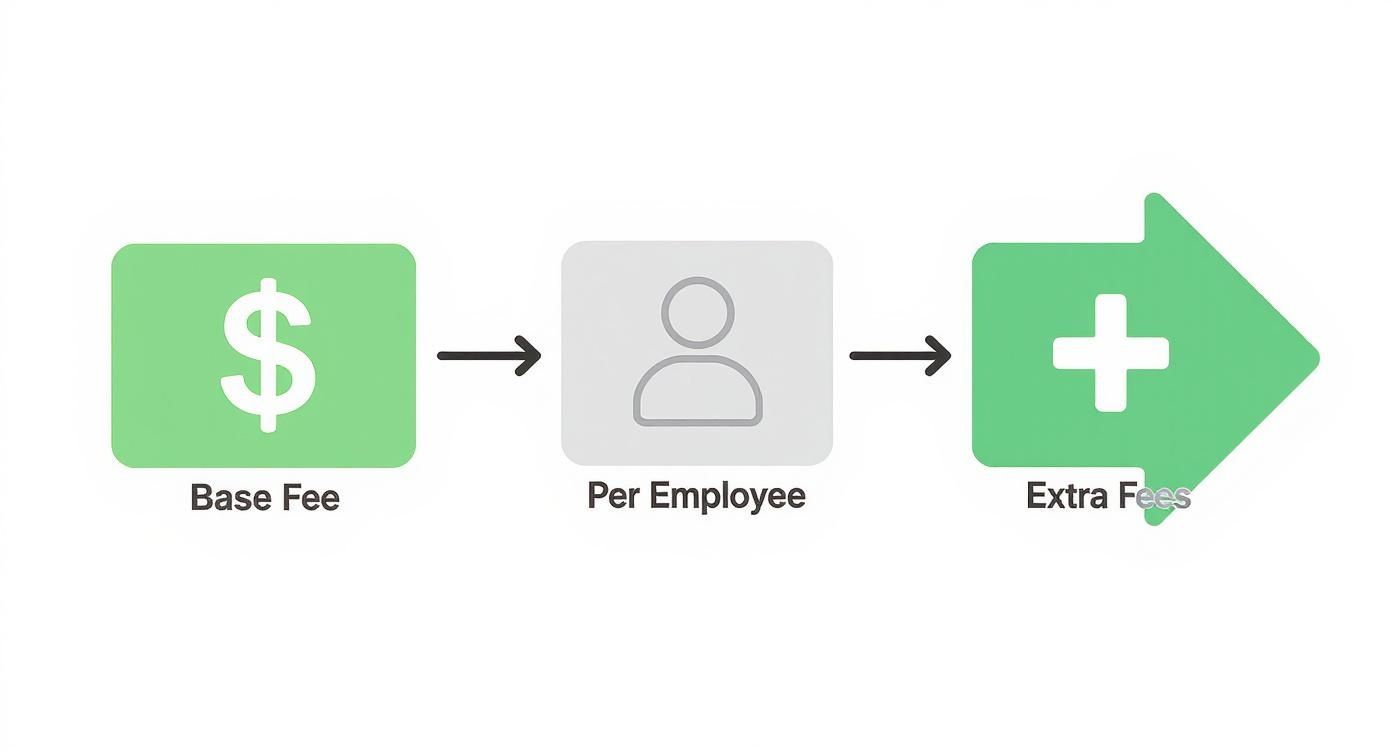
As you can see, your total cost is a mix of a fixed monthly fee, a variable cost that scales with your headcount, and any optional add-on services you choose.
Configuring Your System and Running a Test
With your data loaded in, the next step is to customize the system to reflect how your company actually operates. This is where you’ll set up your pay schedule (weekly, bi-weekly, etc.), define your paid time off (PTO) policies, and add any benefit deductions like health insurance premiums or 401(k) contributions.
The last and most important step before you go live is to run a parallel payroll.
This is exactly what it sounds like: you run payroll in both your old system (even if it's just a spreadsheet) and your new software for the exact same pay period. Then, you compare the results—every net pay, tax withholding, and deduction—to make sure they match perfectly.
Think of this test run as your safety net. It’s your chance to spot and fix any tiny setup mistakes before they affect a real paycheck. It gives you total confidence that the new system is dialed in and ready to go. Once everything lines up, you can finally turn off the old process for good and enjoy your new, more accurate payroll workflow.
Common Questions About Payroll Software
It's natural to have questions when you're thinking about bringing a new tool into your business, and choosing the right payroll software for small business is a big decision. As you weigh your options, a few common concerns always seem to bubble up. Let's walk through them so you can feel confident you're making the right move.
Getting clear answers to these questions is the best way to make sure you’re making a smart investment in your company's future.
When Is the Right Time to Get Payroll Software?
Honestly? The best time is the day you hire your first employee. But if you're already past that point, the next best time is right now—especially if you're spending more than an hour or two on payroll every month.
Starting with software from day one sets you up with accurate, compliant records and a system that can grow with you. It's so much easier to get it right from the start than to untangle a mess later or fix a costly human error that could have been avoided.
Can It Handle Both Employees and Contractors?
Absolutely. Any good payroll platform today is built to handle payments for both your W-2 employees and your 1099 independent contractors. This is a must-have for modern businesses.
The software knows exactly how to track payments for each type of worker, applying the right tax rules (or not, in the case of contractors). Come tax time, it will automatically generate the W-2s and 1099-NECs you need. Everything is kept organized in one central place, which is a massive relief when tax season rolls around.
Reputable payroll providers use enterprise-level security that is typically far more robust than what a small business can manage on its own. Their entire business model is built on protecting sensitive financial data, making security their top priority.
What About Employees in Different States?
This is where payroll software really shines. Managing multi-state payroll is a huge headache to do manually, but a quality system handles all the complex tax calculations and filing rules automatically for every state and city your employees work in.
If you have a remote or distributed team, this feature isn't just nice to have—it's essential. The software keeps up with all the different withholding rates, deadlines, and state-specific forms. Trying to keep track of that on your own is time-consuming and incredibly risky.
How Secure Is My Data in a Cloud System?
This is a great question, and one you should definitely be asking. The top payroll providers invest a fortune in security measures that are far beyond what most small businesses could afford on their own.
When you're comparing options, look for platforms that mention features like:
- Data Encryption: This scrambles your sensitive company and employee data so it's unreadable to anyone who shouldn't see it, both when it's being sent and when it's stored.
- Two-Factor Authentication (2FA): This adds an extra login step to make sure only you can get into your account.
At the end of the day, these companies' reputations are on the line. Keeping your financial information safe is their number one job.
Ready to stop worrying about payroll and focus on growth? The team at Allied Tax Advisors offers expert payroll processing and advisory services to ensure your team is paid accurately and your business stays compliant. Learn how we can simplify your payroll today.