
Getting your hands on an IRS transcript online is easily the quickest way to get things done, whether you're trying to prove your income for a loan or just want to keep your own records straight.
The whole process is pretty straightforward. You'll set up a secure account on the IRS website, confirm you are who you say you are, and then pick the exact transcript you need. If you have all your documents handy, you could be done in as little as 15-30 minutes.
Why You'd Need an IRS Transcript in the First Place
You might be wondering, "Don't I just need a copy of my tax return?" While that's a great start, an official IRS transcript is the government's record of your return, and that's what lenders and other agencies really want to see.
It's the go-to document for some of life's biggest financial steps:
- Applying for a mortgage or other loans: Lenders will pull your transcript to make sure the income you claimed on your application is the same income the IRS has on record.
- Sorting out student financial aid: Colleges and federal aid programs often require them to verify your family's financial situation.
- Dealing with tax problems: A transcript gives you a complete overview of your account, including payments made, penalties, and other important details.
It's clear that people are embracing this online option. In just one recent fiscal year, IRS.gov had around 690 million visits, and taxpayers downloaded over 454 million files. That's a huge shift toward people managing their tax info themselves.
When you're ready, you'll start at the official "Get Transcript" page on the IRS website.
This is your starting line. You'll see options for getting a transcript online or having one mailed to you. For our purposes, we're focusing on that instant "Get Transcript Online" button.
A little prep work goes a long way here. Gathering your documents before you start is the secret to a smooth process. Our 2024 tax filing checklist is a perfect tool to make sure you have everything you need right at your fingertips.
What You Need for IRS Identity Verification

Before you can pull your IRS transcript online, you have to get past a serious security check. This identity verification step is where most people get stuck, so being prepared is the best way to sail through without any headaches.
Think of it as a digital bouncer at a very exclusive club—your financial data. The IRS uses a trusted partner, ID.me, to confirm you are who you say you are. You've got two main ways to do this: a quick automated self-service tool or a live video call with a real person.
Your Verification Checklist
The last thing you want is to get halfway through and have to start over because you're missing a document. Gather everything on this list before you even open the website. Trust me, it makes all the difference.
- A primary photo ID: This must be a government-issued ID. A driver's license, state ID, or passport works perfectly. Just double-check that it hasn't expired!
- Your Social Security number (SSN): You'll need the full number, not just the last four digits.
- A device with a camera: You’ll need a smartphone or a computer with a webcam to snap a selfie and take a photo of your ID.
- An email address and phone number: This is for setting up the account and for the security codes they'll send you.
For the automated route, you'll also need a financial account number tied to your name. This is an extra security layer. You can use the last eight digits of a Visa, Mastercard, or Discover credit card. Alternatively, you can use an account number from a mortgage, student loan, or auto loan.
Pro Tip: Don't have one of the required financial accounts? Don't sweat it. You can skip the automated system entirely and go straight to the live video call with an ID.me agent. It’s a solid backup plan designed for exactly this situation.
If you’re thinking about your overall tax security, it’s also a great idea to read up on how to secure your identity with the IRS Identity Protection PIN. This adds another powerful layer of protection against tax-related identity theft and can offer a lot of peace of mind.
Setting Up Your Secure IRS Online Account
Alright, you've got your documents ready. Now it's time to create the secure online account you'll need to pull your IRS transcript. The IRS uses a trusted partner called ID.me to handle this. Think of it less like creating a simple login and more like building a secure digital identity to protect your sensitive tax information.
First things first, you'll provide your email and create a strong password. You know the drill—make it something you can remember but that's tough for anyone else to guess. After you submit that, they'll shoot a confirmation link to your email just to make sure it's you.
Next up is setting your multi-factor authentication (MFA). This isn't optional; it's a critical security layer. You've got a few choices for how you want to do this:
- Text or Phone Call: A classic. You get a one-time code sent to your phone every time you log in.
- Authenticator App: If you use an app like Google Authenticator or Authy, you can have it generate your login codes.
- Push Notification: This is often the easiest. A notification pops up on the ID.me app on your phone, and you just tap "approve."
- Security Key: For the truly security-conscious, you can use a physical hardware key.
Pick the one that works best for you. This one step is your best defense against someone trying to access your account.
Verifying Your Identity
This is where it gets serious, and it's the part where most people get stuck. You'll need to upload photos of your government-issued ID. Here's a pro tip from someone who's done this a hundred times: put your ID on a dark, plain background. Good, even lighting is key. Glare and blurry photos are the number one reason the system rejects an ID, and it's a pain to have to do it all over again.
After your ID is accepted, you’ll have to take a quick selfie with your phone or webcam. The system compares this live photo to the one on your ID to confirm you are who you say you are. It’s a fast but vital check.
This handy infographic breaks down the basic flow of creating your login and setting up the authentication.
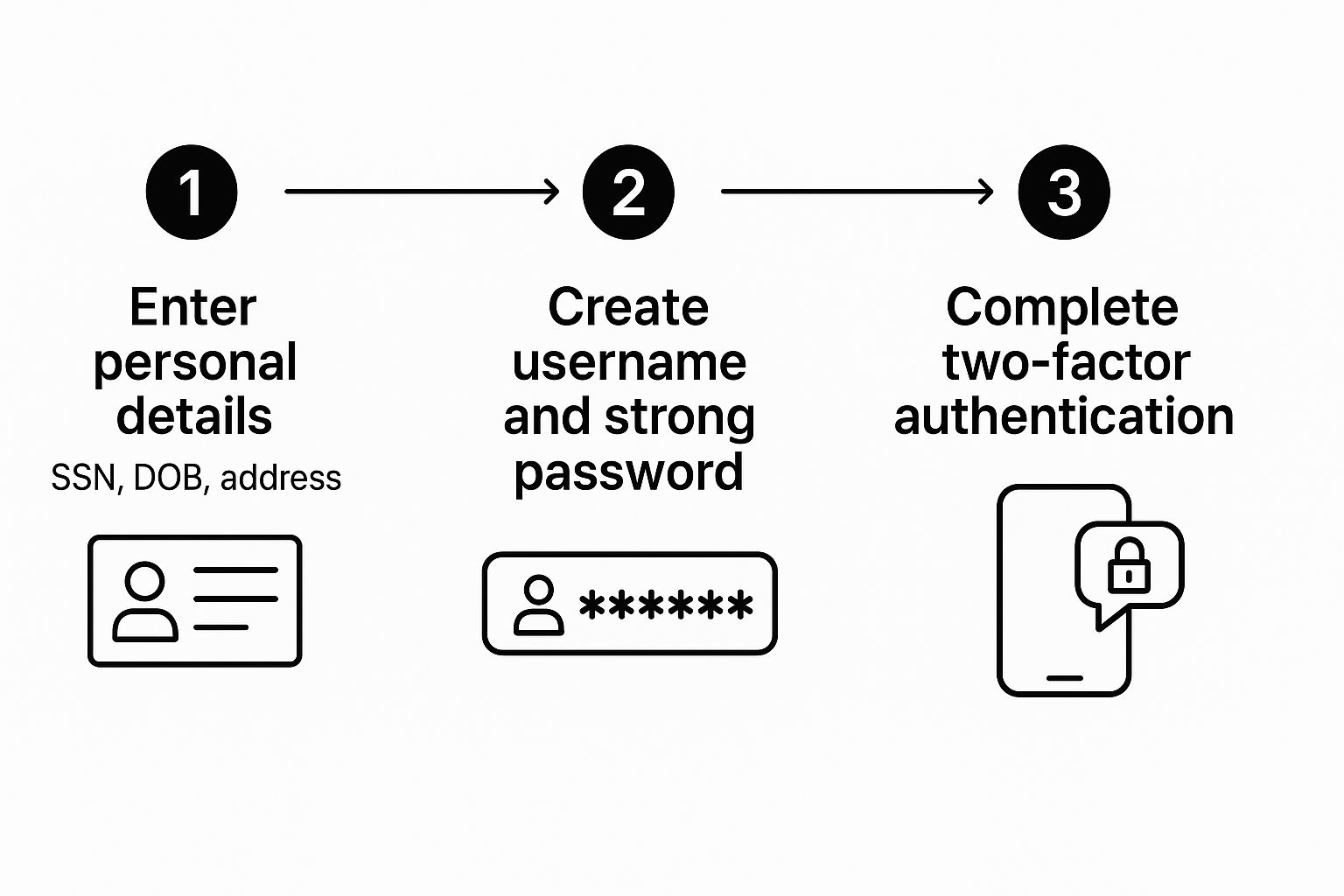
As you can see, it's a pretty linear process. Once you clear these identity hurdles, you're almost there. The final step is the consent screen.
On this screen, you’ll give the IRS formal permission to connect your tax records to the ID.me account you just created. It's essentially the digital handshake that links your verified identity to your IRS file. This is a one-time authorization that grants you ongoing access.
Once you’ve successfully completed this part, breathe a sigh of relief. You've made it through the hardest part of the entire process. From here on out, you're just a few clicks away from getting the documents you need.
Alright, you’ve made it through the identity verification gauntlet and you're logged into your IRS account. Well done—that’s honestly the hardest part.
Now you'll find yourself on the main account dashboard. It can look a little busy, but your eyes should go straight to the section for transcripts. Look for a button or link that says "Get Transcript."
The first thing the IRS will ask is why you need the transcript. You’ll see a dropdown menu with a few options. While it might be tempting to pick one that seems to fit perfectly, a good go-to for most situations is "Higher Education/Student Loan." I’ve found this option consistently gives you access to everything you need without causing any complications.
Once you’ve picked a reason, the system will show you the transcripts available for various tax years. This is where you need to be specific about what you’re pulling.
Selecting the Right Document
The IRS has a few different transcript types, and they all serve different purposes. For most people, it comes down to just two. Knowing the difference will save you from having to go back and download another one later.
- Return Transcript: Think of this as a summary of your original tax return—your Form 1040, 1040A, or 1040EZ. It shows most of the line items exactly as you filed them. This is the one mortgage lenders and financial aid offices almost always want to see.
- Account Transcript: This document gives you the full story of your account for a specific tax year. It includes your original filing info plus any changes or activity that happened afterward, like IRS adjustments, amended returns, payments you’ve made, or penalties assessed. It’s perfect if you need to see your current balance or track down an issue.
So, if you're applying for a home loan, your lender will probably ask for the Return Transcript for the past two years. But if you’re trying to prove to the IRS that you’ve paid off a past-due tax bill, the Account Transcript is what you’ll need to show them.
Pro Tip: When in doubt, just download both. I always grab the Return Transcript and the Account Transcript for the year I need. It takes two extra clicks and ensures you have the complete picture—what you filed and how the IRS processed it. This little habit can prevent a lot of back-and-forth with whoever requested the documents.
The ability to grab these documents online is a huge step up for the IRS. It's part of a broader push to give taxpayers and professionals more direct access, much like the Transcript Delivery System they offer tax pros. It’s a secure and surprisingly efficient way to get the records you need, right when you need them.
Solving Common Transcript Errors and Issues

Even when you follow every step perfectly, trying to pull your IRS transcript online can sometimes hit a snag. I see it all the time—the most common roadblock is a failed identity verification. This can happen for all sorts of reasons, from a blurry photo of your driver's license to a simple typo in your address.
If the automated system rejects your info, don't panic. You'll usually be offered the option to verify your identity on a live video call with an ID.me agent. It’s a solid backup plan designed specifically for these situations.
What to Do When You Are Locked Out
Getting locked out of your account after too many login attempts is incredibly frustrating, but it's not a dead end. Typically, ID.me will make you wait—often 24 hours—before you can try again. Take that time to breathe and gather your documents. Double-check that every piece of information you're entering matches what’s on your official records, down to the last detail.
If you’re still running into a wall, it might be time to change your approach. The online system can be finicky, especially if you've recently moved or changed your name and the databases haven't caught up yet.
Pro Tip: Your best backup plan is to request your transcript by mail using Form 4506-T. It isn't instantaneous, but it’s a reliable way to get the documents you need without dealing with any more digital hurdles.
For tax problems that are more complex or just won't go away, getting professional help can make all the difference. You can learn more about the IRS Taxpayer Advocate Service for help with persistent issues you can’t solve alone. Think of this service as your best resource when the usual channels just aren’t working.
The IRS is constantly trying to make its online tools better, especially since so many of us rely on them. During a recent filing season, taxpayers e-filed over 98 million returns by early April, which just shows how high the demand is. Knowing your alternatives when technology throws you a curveball is the key to staying ahead.
Common Questions About IRS Transcripts
Once you've gone through the steps to get your IRS transcript online, you might still have a few questions. That's perfectly normal. Let's tackle some of the most common things people ask so you can be confident in the documents you've just downloaded.
How Fast Can I Actually Get My Transcript?
If you get through the ID.me verification process without any hitches, your access is immediate. Seriously.
From the moment you start the registration to having the PDF transcript saved on your computer, you could be done in as little as 15-30 minutes. The key is having all your documents ready to go. This is, without a doubt, the quickest way to get your hands on these records.
Is It Safe to Create an IRS Online Account?
Yes, it's very secure. The IRS uses ID.me for a reason—it's a trusted technology partner that meets the government's high-level security requirements for identity proofing.
On top of that, your account is protected by mandatory multi-factor authentication. This means that even if someone somehow got your password, they still couldn't log in without that second verification step. It's a standard security practice that adds a crucial layer of protection.
What if I don't have a credit card or a loan for the automatic verification? No problem. Just select the option for a live video call with an ID.me agent. A real person will help you verify your identity using your photo ID. It’s a common and secure alternative that a lot of people use.
Having a clear picture of your tax history is fundamental to smart financial planning. For example, reviewing several years of your transcripts is often the first step before putting into action the best tax strategies for high income earners.
At Allied Tax Advisors, we simplify the complexities of tax management, from personal filings to business compliance. Our team is dedicated to providing clear, actionable advice to help you achieve your financial goals. Discover how our tax services can support you.
Pretty! This was an extremely wonderful article.
Many thanks for providing this info.