
Most advice about a small business bookkeeping template starts in the wrong place. It tells you to pick a spreadsheet, download a file, and start typing, as if the template itself is the decision. It isn't. The actual decision is how much manual bookkeeping you're willing to carry every week, because a template that looks tidy on day one can become a mess by the time taxes are due.
A good template helps you organize transactions, but it won't rescue a sloppy workflow. That's why the right question isn't “Which free file should I use?” It's whether you can sustain the process behind it, or whether you need bank-feed automation, accounting software, or a bookkeeper before the books fall behind.
Table of Contents
- Why a Template Is Only Half the Answer
- Anatomy of a Working Bookkeeping Template
- Building a Chart of Accounts That Fits Your Business
- Recording Transactions and Reconciling Each Month
- Adapting the Template to Your Business Type
- When a Template Stops Being Enough
- Bridging Bookkeeping and Tax Season Without Rework
Why a Template Is Only Half the Answer
A free spreadsheet is not a bookkeeping system. It's a container, and if you don't build a routine around it, it turns into a graveyard of half-finished tabs and unexplained categories. The market already reflects that reality. Template libraries are broad, with Smartsheet offering 23 free small-business bookkeeping templates, Vencru listing 25 free bookkeeping templates across 6 categories, and FreebieTemplate advertising 47 bookkeeping and finance templates. That variety exists because owners need different setups, not because one perfect file solves the problem. Smartsheet's bookkeeping template collection

Ask the hard questions before you choose
Start with three questions. First, how many transactions hit the books each month? Second, does the business have inventory or payroll? Third, how much time will you spend on bookkeeping each week?
Practical rule: if you won't touch the books weekly, don't buy a fancier template. Buy a simpler one, or move to software.
A service business with light transaction volume can usually get by with a clean spreadsheet and monthly reconciliation. A retail shop with inventory and sales-tax tracking needs more structure. A business with payroll, reimbursements, contractor payments, and frequent bank activity is already brushing against the limits of manual spreadsheet work.
That's why the maintenance burden matters more than the feature list. A workbook can have a polished dashboard and still fail if the owner stops entering data after a busy week. The better setup is the one you can keep current without resenting it. If that means a plain ledger with a tight month-end routine, use that. If it means a hybrid system with bank imports and software on top, stop pretending a download alone is enough. For owners setting up the operational side from scratch, this QuickBooks setup guide is a useful companion when spreadsheets stop being practical.
Template-only, hybrid, or full software
Use a template-only system when transactions are light and your recordkeeping is simple. Use a hybrid setup when you can still manage the structure in a spreadsheet but want bank feeds or exports to reduce entry work. Move to full accounting software when your books require more consistency than a file can realistically hold together.
The honest line is simple. If the template helps you stay organized without becoming another weekly chore, keep it. If it becomes a place where transactions go to disappear, you've outgrown it.
Anatomy of a Working Bookkeeping Template
A usable small business bookkeeping template isn't a single sheet. It's a set of linked tabs that force clean input and produce a readable month-end summary. The structure matters because bookkeeping problems usually come from missing detail, not from fancy reports. One Excel-based template circulating online advertises 15 revenue categories, 50 expense categories, 5 asset categories, and up to 20,000 transaction lines, plus monthly, quarterly, and annual income statements, a dashboard, and an accountant summary. That's what a mature template looks like now. See the template structure in this walkthrough
The core tabs you actually need
At minimum, build these pieces:
- Transaction log: date, customer or vendor, invoice number, payment method, category, amount, and a flag for recurring versus one-time items.
- Chart of accounts: the master list of income, expense, asset, liability, and equity categories.
- Accounts receivable subledger: every unpaid customer invoice.
- Accounts payable subledger: every unpaid bill.
- Bank reconciliation tab: statement balance, book balance, and outstanding items.
- Monthly summary: revenue, major expense categories, net income, accounts receivable, accounts payable, and cash on hand.
The point of those tabs is control. If the template doesn't separate open invoices from paid bills, you'll end up guessing what's owed. If it doesn't roll the month into a summary, you won't spot category drift until much later. The monthly reconciliation benchmark is simple, reconcile at least monthly so errors are caught before the books close. That workflow is laid out cleanly in this bookkeeping setup guide.
The controls that prevent dumb mistakes
Good templates include guardrails. Date fields should block entries outside the selected reporting period. Category drop-downs should pull from the chart of accounts, not free-form typing. That keeps one person from entering “ads,” another from entering “marketing,” and a third from entering “promotion” for the same cost.
Don't let a spreadsheet become a suggestion box. Use validation so the file forces consistency.
The other essential element is separation. Don't bury payroll inside general expenses. Don't mix customer receipts with owner transfers. When the template treats every transaction the same, month-end review gets sloppy fast. A clean workbook gives each money flow its own lane, and that's what makes it worth using. For a detailed setup example, this Excel template tips guide is worth a look.
Building a Chart of Accounts That Fits Your Business
The chart of accounts is the spine of the whole file. If it's too broad, your reports become mushy. If it's too detailed, nobody uses it. The right version is lean, specific, and built for the way your business earns and spends money. That's why I'd rather see a tight list with clear labels than a bloated chart that tries to anticipate every possible expense.
Start with the five accounting classes
Use the standard five buckets, assets, liabilities, equity, revenue, and expenses. Keep the categories recognizable so your monthly P&L stays readable.
| Classification | Core Accounts | Typical Sub-Accounts |
|---|---|---|
| Assets | Cash, bank account, accounts receivable, fixed assets | Petty cash, equipment, prepaid expenses |
| Liabilities | Accounts payable, sales tax payable, payroll liabilities | Credit cards, contractor payables, loan balances |
| Equity | Owner's equity, retained earnings, owner draws | Capital contributions, distributions |
| Revenue | Sales, service income, other income | Project income, product sales, consulting fees |
| Expenses | Rent, supplies, software, travel, payroll expenses | Merchant fees, insurance, advertising, utilities, cost of goods sold |
For a nonprofit-style example of how account grouping changes reporting discipline, Grain's guide to fund accounting shows a very different approach, and that contrast is useful even for for-profit owners. It reminds you that the chart should match the purpose of the books, not just the shape of the software.
What belongs on its own line
Owner draws deserve their own equity line. Sales tax payable belongs in liabilities, not expenses. Payroll liabilities need to stay separate from ordinary operating costs. If you collapse those items into general expenses, you'll distort tax reporting and make the month-end review harder than it should be.
The common additions come later. Many businesses eventually add merchant fees, software subscriptions, cost of goods sold, and contractor payments because those lines matter in real life. Don't add everything at once. Start with the categories you know you'll use, then refine after a month or two of posting. For a plain-English overview of the structure, this chart of accounts explainer is a solid reference point.
Keep the chart lean enough to read
A chart of accounts should help you make decisions, not bury them. If your monthly P&L starts to look like a junk drawer, trim the list. Merge categories that don't change how you manage the business. Split only the lines that affect pricing, tax treatment, or cash flow.
Bottom line: if a category doesn't help you decide something, it probably doesn't deserve its own line.
Recording Transactions and Reconciling Each Month
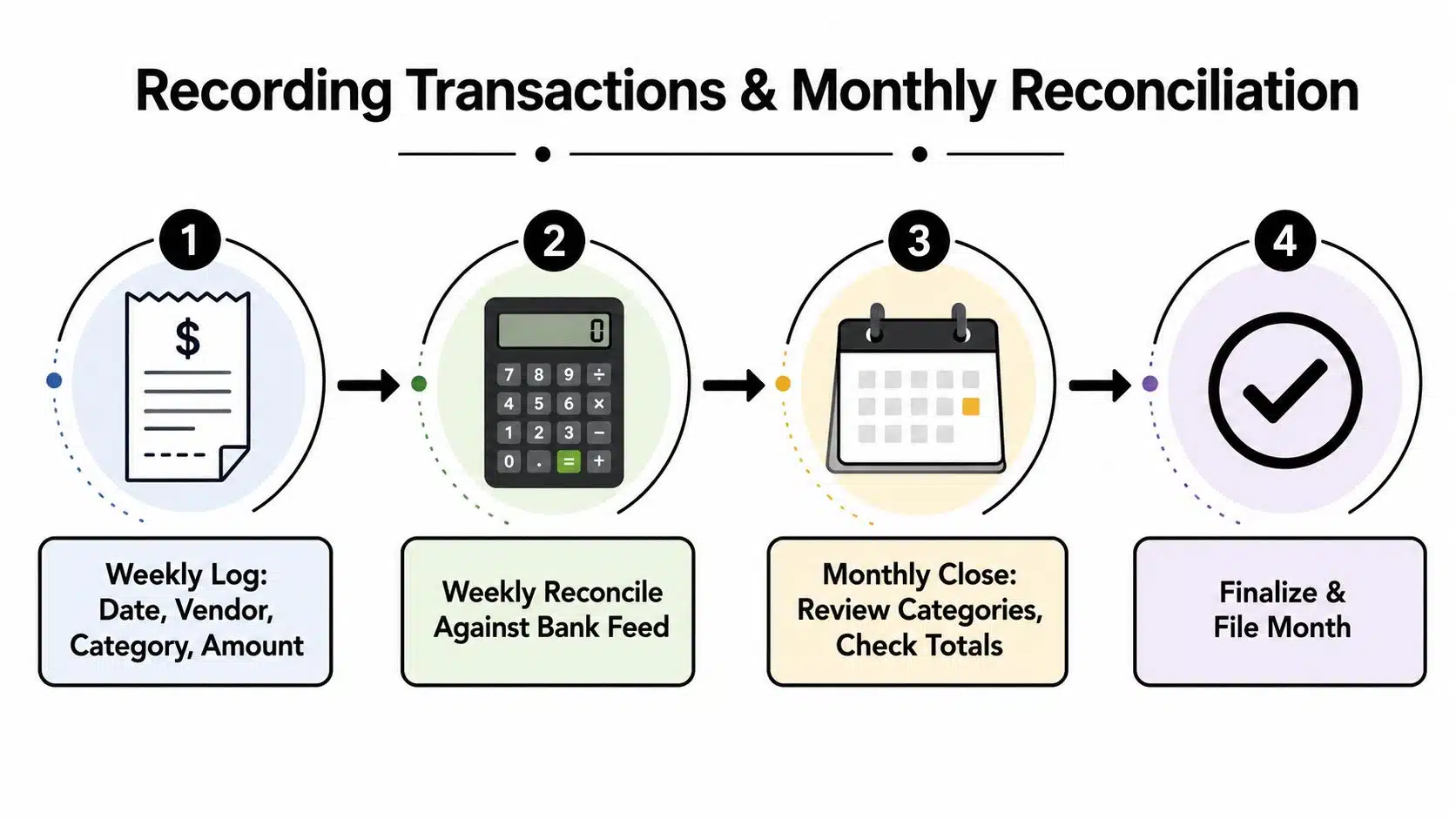
A template only works when the owner treats it like a routine. Weekly entry is the habit, monthly reconciliation is the proof. If you wait until quarter-end or tax season, the file stops being a bookkeeping tool and becomes a memory test.
Weekly entry should be boring
Log transactions with the same fields every time, date, customer or vendor, invoice number, payment method, category, and whether the item is recurring or one-time. That keeps the file usable when you need to search by vendor or review cash flow patterns. It also gives your accountant a cleaner trail if they ask questions later.
The goal is not perfection. It's consistency. A service-business owner can usually handle this with one short weekly session, entering bank downloads, matching invoices, and tagging costs before they pile up. If that sounds tedious, it is, but it's far less painful than reconstructing three months of expenses from a bank statement.
Month-end close should catch the misses
At month end, reconcile the bank statement against the books, confirm open receivables, review unpaid bills, and scan the summary tab for category swings. That's the moment to catch duplicate charges, missing deposits, miscategorized expenses, and anything that looks off before the books harden.
A simple service-business example makes the flow clear. A consultant invoices a client on Monday, receives a payment on Thursday, enters the transaction that night, and tags it to the right revenue line. At month end, the bank feed shows the deposit, the receivable clears, and the summary sheet reflects the payment in the right period. That's clean bookkeeping.
If you want a checklist to keep the close moving, this monthly bookkeeping checklist lines up well with a spreadsheet-based workflow.
Don't skip the subsidiary ledgers
The biggest failure is pretending the general ledger tells the whole story. It doesn't. If you skip accounts receivable or accounts payable detail, you lose visibility into what's owed. If you delay reconciliation, you make duplicate charges and missing deposits harder to catch later.
Reconciliation is not a nice-to-have. It's the step that turns data entry into bookkeeping.
Adapting the Template to Your Business Type
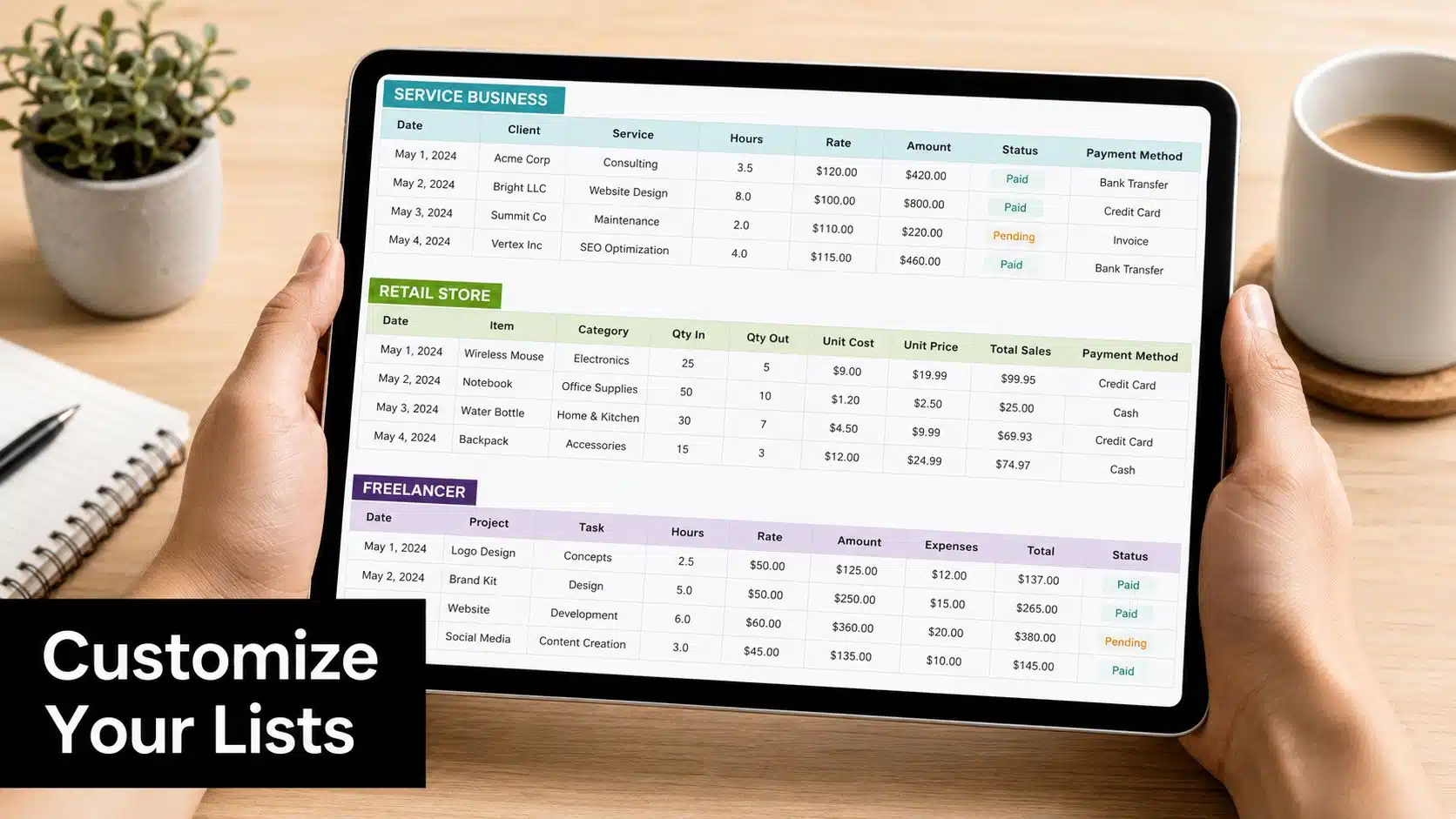
One template does not fit every business, and the wrong setup creates more work than it removes. A service company, a retail shop, and a solo freelancer all need different detail levels. The trick is cutting dead weight, not adding it.
Service businesses need clean project visibility
Consultants, designers, marketers, and agencies usually need project income, service revenue, subcontractor costs, and software subscriptions. They often do not need inventory tabs, but they do need a sharp receivables workflow because unpaid invoices can pile up fast. A slim chart of accounts works best here, because the owner usually cares more about margin by client or service line than about product movement.
Retail and e-commerce need inventory and sales tax detail
Product businesses need cost of goods sold, inventory tracking, merchant fees, and sales tax by jurisdiction. Those are not optional extras. If you sell physical goods or run an online store, the template has to track what was sold, what was collected, and what still needs to be remitted. That's where a general-purpose spreadsheet often starts to strain.
Solo consultants need less, not more
Freelancers and solo operators can usually run lean. A simple revenue section, home-office allocation, contractor expenses if needed, and quarterly estimated-tax tracking are often enough. They do not need a bloated workbook with five tabs they never touch. A cleaner setup means the owner keeps up with it.
| Business type | Add these tabs | Skip or minimize these |
|---|---|---|
| Service business | Project revenue, accounts receivable, software, subcontractors | Inventory, sales-tax by location |
| Retail or e-commerce | Inventory, cost of goods sold, sales-tax tracker, merchant fees | Home-office detail unless relevant |
| Solo consultant | Simple income, owner draws, quarterly tax tracker | Inventory, payroll, heavy receivables detail |
If you keep restaurant or POS data in the mix, it helps to separate sales source files from the P&L logic. A practical example of that kind of reporting discipline appears in OrderOut's guide to using POS data in a profit and loss statement, which shows why source data and reporting layout should never be the same thing.
Match the template to the work you'll repeat
If a tab doesn't support a recurring task, drop it. If a category doesn't change your decisions, merge it. The best version is the one that fits the business you run, not the one that looks impressive in a download page.
When a Template Stops Being Enough
A simple template you maintain beats a complicated one you abandon. That's not a theory, it's what I see when owners come in with months of uncategorized transactions and a folder full of abandoned spreadsheets. More tabs do not save bad habits. They usually hide them.
The warning signs are obvious
If bank-feed reconciliation takes days, the template is too manual for your volume. If payroll keeps getting mixed into operating expenses, your chart is too loose. If sales tax filings require a pile of manual calculations, the spreadsheet is doing work software should be handling. And if you're avoiding the books altogether, the system has already failed.
A restaurant or retail owner staring at POS exports, card settlements, and sales-tax obligations usually hits this wall first. When the bookkeeping process starts to depend on memory and patience instead of structure, the file has stopped being helpful.
Software is worth it when the maintenance cost rises
At that point, bank-feed imports, automation, or accounting software become the sensible move. QuickBooks is a common next step for businesses that want recurring categorization, bank reconciliation, and cleaner month-end reporting. Allied Tax Advisors also provides bookkeeping with QuickBooks, which fits owners who want the bookkeeping workflow handled in a system built for recurring reconciliation rather than a hand-built spreadsheet.
Hire help before the books get away from you
Some owners don't need software alone. They need someone to run the close. If you're spending all your time fixing old entries, let a bookkeeper or advisor handle the cleanup and reset the structure. That's often cheaper than living with a messy file for another year.
The test is simple. If the template supports your week, keep it. If it creates dread every month, it's too small for the job.
Bridging Bookkeeping and Tax Season Without Rework
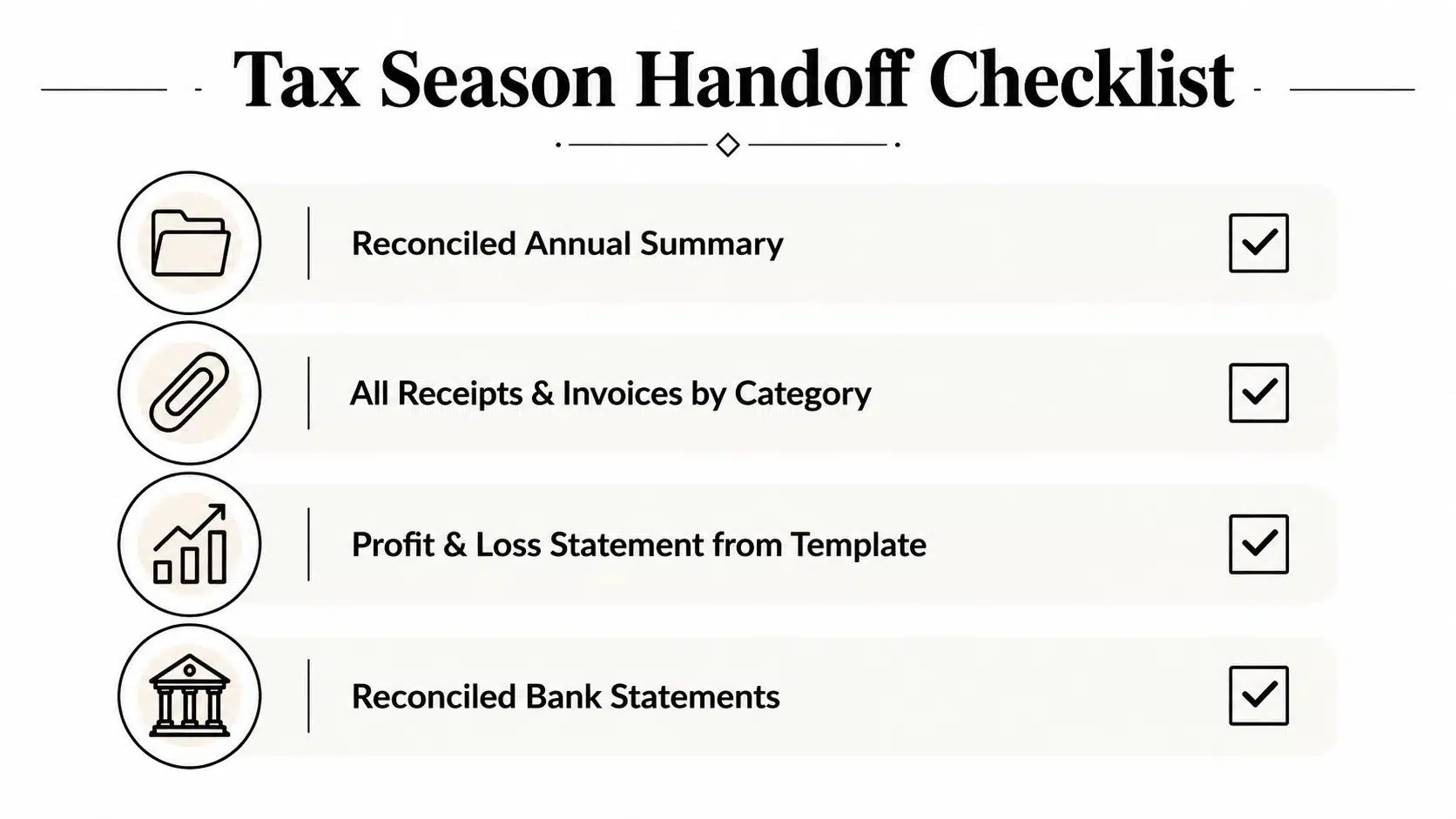
Tax season punishes sloppy bookkeeping. A good template makes the handoff cleaner, but only if the records were maintained during the year. The accountant should get a reconciled transaction log, year-end bank statements, and the profit-and-loss summary from the template. If those pieces are missing, tax prep turns into a cleanup project.
Clean the obvious trouble spots first
Before handing off the file, confirm that owner draws are classified correctly, payroll isn't buried in ordinary expenses, and sales tax collected matches sales tax paid. If you use contractors, keep their payment records organized so 1099 prep isn't a scavenger hunt. For rental-property owners or anyone tracking deductible property costs, this guide on substantiating rental expenses is a useful reminder that clean ledgers and backup documents belong together.
Keep tax records tied to the books
Most tax authorities expect receipts for deductible expenses, and businesses should keep an asset register if they expect depreciation to be handled properly. Quarterly estimated-tax tracking also belongs in the same system, because it keeps owners from treating tax as a once-a-year surprise. A spreadsheet can do that job if it's kept current.
A tidy year-end file is built in March, June, September, and December, not in the week before filing.
Use the template as a maintenance tool
The year-end checklist is short. Reconcile the bank. Confirm the P&L. Organize receipts by category. Separate any owner or payroll items that got mixed in. If those are done, the template has done its job. If they are not, the problem was never the file format, it was the lack of maintenance.
If your books are ready for a better setup, Allied Tax Advisors can help you clean up the workflow and keep it steady through the year. They handle bookkeeping, QuickBooks support, tax prep, and the kind of month-end discipline that keeps a spreadsheet from turning into a year-end scramble. Visit Allied Tax Advisors if you want a practical review of your current bookkeeping setup and a clearer path to something you can maintain.