
By mid-year, your bank balance may look healthy while QuickBooks tells a different story. Several months of transactions sit unreconciled, invoices are scattered across email, receipts are missing, and a tax deadline or loan application is getting closer. You keep telling yourself you'll catch up bookkeeping this weekend, but every new payment adds another item to the pile.
That backlog isn't just an administrative annoyance. It can hide unpaid invoices, duplicate expenses, misclassified transfers, and cash-flow problems. A structured process brings the records back in order, gives your tax preparer reliable information, and restores the financial visibility you need to make decisions. The key is to treat the delay as a data and workflow problem, rather than a mountain of transactions waiting for manual entry.
Table of Contents
- Introduction To Catch Up Bookkeeping
- Preparing For Catch Up Bookkeeping
- Performing Catch Up Reconciliation
- Using QuickBooks For Catch Up Tasks
- Typical Timelines And Common Pitfalls
- Knowing When To Hire A Professional
- Conclusion And Next Steps
Introduction To Catch Up Bookkeeping
Consider an owner-managed service business that stopped reconciling its accounts after a busy season. The owner still paid vendors and sent invoices, but bookkeeping became an afterthought. Months later, the business has bank-feed entries without supporting receipts, customer payments that aren't connected to invoices, and loan payments recorded as ordinary expenses.
That situation is common because small-business owners often carry the bookkeeping themselves. One industry survey reported that 64% of business owners do their own bookkeeping, while 21% say they don't know enough about bookkeeping, and nearly 70% of small businesses don't have an accountant. Those figures help explain why records fall behind, particularly when the owner is also handling sales, operations, payroll, and customer service. The bookkeeping statistics summarized by Rigits provide that context.
Catch-up bookkeeping means reconstructing missing or unreliable records, then bringing each account to a verified ending balance. The work should produce more than an empty bank-feed queue. You need reconciled accounts, correctly classified activity, documented exceptions, and financial reports that you can trust.
Practical rule: Don't start by clicking through the newest transactions. Start by defining the gap and locating the source records that prove what happened.
Preparing For Catch Up Bookkeeping
Catch-up work slows down before QuickBooks is opened when records are scattered across inboxes, bank portals, payment processors, and employee folders. Set the cutoff for each account first. The last completed reconciliation gives you a defensible starting point, while a general statement that “QuickBooks is several months behind” does not. Different accounts may have different cutoff dates.
Define the backlog before touching QuickBooks
Build an account map that identifies:
- Account: Every business checking, savings, credit card, payment processor, and loan account.
- Last reliable period: The latest statement ending date and whether that period was reconciled.
- Missing records: Absent statements, receipts, invoices, payroll reports, loan documents, or processor reports.
- Business purpose: Whether the cleanup supports tax filing, financing, management reporting, or all three.
Then download complete statements and reports. Bank feeds are useful for importing activity, but older entries may be missing, descriptions may be incomplete, and overlapping downloads can create duplicates. Statements, invoices, payroll reports, loan schedules, receipts, and payment-processor reports provide the evidence needed to classify transactions and resolve exceptions.

Build a document system that exposes missing data
Use cloud storage or a shared drive with folders organized by month and document type. Separate bank statements, credit card statements, sales, bills, payroll, loans, receipts, and follow-up questions. Name each file consistently, such as account name followed by statement period. This prevents repeated searches through unlabelled attachments.
Create an exception log before cleanup begins. For every incomplete item, record the account, period, transaction description, amount, missing document, and person responsible for finding it. Assigning ownership exposes the data bottlenecks that commonly delay catch-up work.
Keep QuickBooks intake clean by storing source files outside the bank-feed queue, then attaching the relevant document to the transaction after review. That approach makes later questions easier to answer and reduces duplicate entries. A defined intake process, as outlined in Xendoo's catch-up bookkeeping guidance, gives owners a practical starting point.
Performing Catch Up Reconciliation
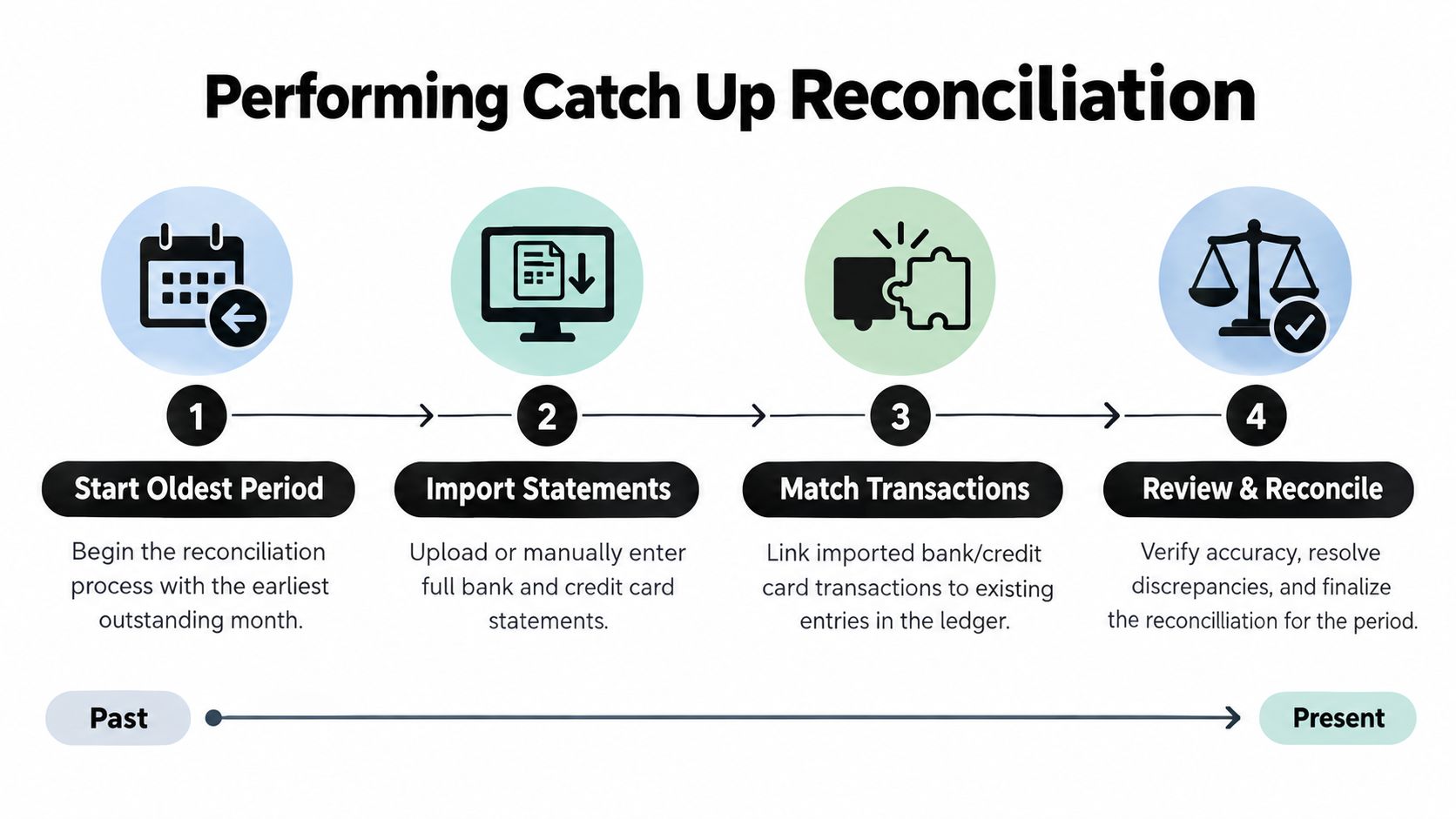
Reconcile chronologically, one account and statement period at a time. Begin with the oldest unreconciled period, because its ending balance becomes the opening point for the next period. Starting with the newest month may make the current reports look better, but it leaves the underlying balance unverified.
Reconstruct each period from primary records
Import or enter the complete bank and credit card statement activity for the first open period. Then classify each item by comparing it with the related source document. A bank description can identify a vendor, but it doesn't always establish whether the payment was an expense, an owner draw, a loan payment, or a transfer between business accounts.
Use this order:
- Confirm the statement range: Check the beginning balance, ending balance, statement date, and account name.
- Review existing ledger entries: Look for transactions already entered before adding imported activity.
- Match supporting records: Connect payments to invoices, bills, receipts, payroll reports, or loan statements.
- Separate transfers: Record movement between company accounts as transfers, not as income and expenses.
- Investigate exceptions: Document refunds, credits, duplicates, personal items, and unexplained deposits.
- Reconcile the period: Finish only after the ledger agrees with the statement and unresolved items are explained.
Refunds and credits deserve special attention. A vendor refund should generally connect to the original purchase or the appropriate expense account, while a customer credit may affect receivables or revenue treatment. Don't force an unexplained difference into a generic adjustment account only to make the reconciliation screen balance.
Close the month before moving forward
After reconciling the statement, review the period's Profit and Loss, Balance Sheet, open invoices, unpaid bills, and uncategorized transactions. If a balance seems wrong, pause and find the cause before continuing. Fixing an error immediately prevents it from being carried into every later month.
The recommended sequence is to scope the backlog, gather every source, reconstruct from the oldest unreconciled period, close each period, and then produce final reports. OneBooks' catch-up bookkeeping guide supports this month-by-month approach and emphasizes complete statements and source documents over bank-feed history alone.
For a separate explanation of why matching statement activity to the ledger matters, see this practical guide to reconcile for your restaurant. Businesses with multiple accounts can also use bank account reconciliation guidance to formalize the review.
Using QuickBooks For Catch Up Tasks
QuickBooks Online can reduce repetitive work, but automation won't decide whether a transaction is correct. Use it to collect, sort, and suggest matches. Keep human review for unusual payments, transfers, payroll, loans, equity, and anything that lacks clear documentation.
Use imports and matching carefully
If historical activity isn't available through the connected bank feed, download statements in a supported file format from the financial institution and import the missing range. Before uploading, compare the file's earliest and latest dates with the transactions already in QuickBooks. Overlapping ranges can create duplicates.
In the Bank transactions area, review each item as one of four possibilities:
- Match: An existing QuickBooks transaction corresponds to the downloaded item.
- Add: The bank activity is missing and needs a new ledger entry.
- Transfer: Funds moved between accounts and shouldn't be categorized as revenue or expense.
- Exclude: The item is duplicated, personal, or otherwise outside the business records.
Banking rules can help categorize recurring, well-understood payments, such as a regular software subscription. Don't create broad rules for vague merchants. A rule that automatically assigns every payment from a vendor to one account can unintentionally misclassify refunds, deposits, or unusual purchases.
Reduce repeated entry without reducing control
Recurring transactions are useful for consistent bills, but review the amount, date, and account each time during catch-up work. Bulk editing can accelerate cleanup when the same correction applies to a clearly defined group. It shouldn't replace transaction-level review when the supporting documents differ.
Filter by account, date, transaction type, payee, and review status. Then run period-specific reports after each reconciliation. A clean bank-feed queue doesn't prove the books are accurate. Your reports must also show sensible balances, applied customer payments, recorded liabilities, and properly classified expenses.
Owners in manufacturing or inventory-heavy businesses may need accounting workflows that extend beyond basic bank feeds. Uptool's manufacturing software resources can provide useful context when QuickBooks needs to work alongside operational systems. For category decisions inside QuickBooks, use this guide on how to categorize expenses in QuickBooks.
Typical Timelines And Common Pitfalls
Catch-up time depends on open periods, account count, transaction volume, and document quality. A short gap with organized statements differs sharply from a backlog containing missing payroll records, loan activity, or years of inconsistent categorization.
Use these ranges for planning, not promises. They assume the required records are available and questions receive prompt answers.
| Backlog Size | Estimated Catch-Up Time |
|---|---|
| Minor delay, one to three months | Several focused work sessions |
| Moderate backlog, four to six months | A structured project requiring recurring work blocks |
| Extensive gap, seven months or more | A larger cleanup that may require professional support |
The date range alone can hide the workload. One month with several accounts and incomplete records may require more investigation than multiple simple periods. Before entering transactions, gather statements, receipt exports, loan schedules, payroll reports, and access credentials in one intake folder. QuickBooks cleanup moves faster when each account has a complete source set and files follow consistent names and dates.
Stop when the evidence stops
Common bottlenecks include missing statements, inaccessible receipt files, duplicate uploads, unclear transfers, and inconsistent payee names. Each unresolved item creates rework when entries continue without support. Keep an exception log, record the missing evidence, and assign each question to the person who can answer it.
Delayed bookkeeping can slow month-end close and increase error risk. Many businesses fall behind on their books, making the backlog harder to clear as unsupported entries accumulate, as discussed in Xendoo's overview of catch-up bookkeeping. Set a deadline for record collection, not for guessing. A documented reconciliation with clearly marked exceptions is more useful than fast reports that cannot withstand review.
Knowing When To Hire A Professional
Handle a small, well-documented backlog yourself if you understand your chart of accounts and can review every exception. Bring in a CPA or experienced bookkeeper when the work involves multiple accounts, payroll discrepancies, loans, sales tax, inventory, equity, or periods connected to filed returns. Complexity matters more than the calendar alone.
Professional help is especially valuable when you need tax-ready reports, financing documents, or a reliable opening balance for ongoing bookkeeping. Ask candidates about QuickBooks Online experience, their reconciliation process, document-security practices, review checkpoints, and how they handle unsupported transactions. A provider should explain what it needs before work begins, not only promise to clear the queue.
The underlying problem is often access to information. Nearly eight in 10 corporate finance professionals say month-end close delays stem from waiting for data from other systems or departments, supporting the view that cleanup requires better document flow as well as transaction entry. CFO Dive's report on close delays and data bottlenecks makes that operational point clear.
If you need administrative help with document collection, you might evaluate Hire Latin American virtual assistants for organized intake tasks, while an accounting professional handles classification and reconciliation. Allied Tax Advisors also offers bookkeeping cleanup services for businesses whose records need structured catch-up work.
Conclusion And Next Steps
Catch-up bookkeeping works when you control the sequence. Identify the last reliable period, map every account, collect complete statements and supporting records, and reconcile from the oldest open month forward. Use QuickBooks imports, matching, rules, filters, and recurring entries to reduce repetitive work, but keep human review over transfers, payroll, loans, refunds, and unexplained items.
Don't measure success by an empty bank-feed screen. Measure it by reconciled statements, supported transactions, explainable exceptions, and financial reports that reflect the business. If the backlog is complex or the source data is incomplete, hiring help sooner prevents more rework and gives you a clean process for staying current.
Allied Tax Advisors can help reconstruct missing activity, reconcile QuickBooks accounts, and prepare dependable financial reports for tax and business decisions. Visit Allied Tax Advisors to discuss your bookkeeping backlog and get a practical plan for bringing the records current.