
You open QuickBooks, glance at the bank balance, and something feels off.
The report looked fine last week. Now an expense account is higher than expected, an invoice seems to have vanished, or a reconciled account no longer ties out. At that moment, business owners often ask the same question: Who changed this?
That’s where the audit trail in QuickBooks stops being a technical feature and starts becoming your best detective. It helps you trace changes back to the person, date, and action behind them. When the books don’t match your expectations, the audit trail gives you a path back to the truth.
If you're already dealing with month-end cleanup, this usually shows up while you're reconciling a bank account. Reconciliation often reveals the symptom. The audit trail helps you find the cause.
Small business owners often assume QuickBooks stores only the final version of a transaction. It doesn’t. In many cases, QuickBooks also preserves the history around that transaction. That matters for ordinary bookkeeping mistakes, but it matters even more when you're trying to prove compliance, investigate suspicious edits, or respond to an IRS or state notice.
A lot of guides stop at “click this menu, run this report.” That’s not enough. Developing the skill to read the audit trail, spot what’s normal, and recognize what deserves a closer look. That’s the difference between browsing a report and using it like a CPA.
Introduction The Mystery of the Mismatched Numbers
A mismatched number usually doesn’t announce itself politely. It shows up late.
You might notice it during month-end close. You might see it while reviewing payroll, sales tax, or rental property expenses. Sometimes you only spot it after a lender, investor, or tax preparer asks a question you thought would be easy to answer.
The stressful part isn't only the wrong number. It's not knowing whether the issue came from a simple typo, a duplicate entry, a deletion, a sync problem, or an unauthorized change.
That uncertainty is why the audit trail in QuickBooks matters. It gives context to the numbers. It shows how a transaction got from its original form to what you're seeing now.
Why small errors feel bigger than they are
Business owners often jump straight to worst-case scenarios. That’s understandable.
If a payment disappeared, you may worry about fraud. If an invoice changed, you may worry your revenue reports are unreliable. If an old transaction was edited after reconciliation, you may worry every report since then is off.
Sometimes the cause is harmless. An employee corrected the wrong vendor. A bookkeeper recoded an expense. An accountant posted a year-end adjustment.
Sometimes it isn’t harmless. The only safe response is to verify.
When numbers change without a clear reason, don’t guess. Trace.
The report many users ignore until something breaks
The audit trail is often treated like the attic of QuickBooks. It’s there, but many users don’t open it until they’re desperate.
That’s a mistake. This feature isn’t just for external audits. It helps with everyday oversight:
- Finding edits that changed reconciled balances
- Confirming accountability when several users touch the same books
- Reviewing deletions that affect cash flow or reporting
- Supporting documentation when a tax authority asks for transaction history
If you think of your financial statements as the final movie, the audit trail is the behind-the-scenes footage. It shows what happened between the first draft and the final cut.
What Is the QuickBooks Audit Trail Really
The easiest way to understand it is this: the audit trail is a security camera for your books.
It doesn’t just show that a bill exists. It records that the bill was created, changed, or deleted. It identifies the user involved and captures when the action happened. In some situations, it also shows the prior version so you can compare before and after.

It’s more than a list of transactions
Many users expect a register-style report. That’s not what this is.
A transaction list tells you what currently exists. The audit trail tells you what happened to get there. That difference is significant.
If a contractor payment was entered for one amount and later changed, the audit trail helps expose the change history. If a user deletes something outright, that action can still leave a footprint. For anyone trying to defend records during an inquiry or investigate internal irregularities, that footprint matters.
The most important feature is that it’s immutable
One fact changes how seriously you should take this report: QuickBooks’ audit trail operates as a permanent, non-deletable record that has been automatically enabled since 2006, and it cannot be disabled or deleted, according to Kaufman Rossin’s explanation of the QuickBooks audit log.
That immutability is what gives the audit trail weight. If users could switch it off or erase history, it would be much less useful in a dispute, audit, or fraud review.
It's comparable to wet cement that hardens around every action. Once the event happens, the impression stays.
Why that matters in real life
This matters most when records are under pressure.
For a crypto investor, transaction support may need to withstand tax scrutiny. For a rental property owner, expense classification can affect deductions and compliance. For any business with multiple users, the ability to show who changed what can support internal controls and resolve disagreements quickly.
Here’s the practical takeaway:
- For compliance: you have a defensible record of activity
- For operations: managers can coach users based on actual changes
- For disputes: you can reconstruct history instead of relying on memory
- For fraud prevention: unusual edits leave evidence
Practical rule: Don’t think of the audit trail as a backup. Think of it as evidence.
What it typically captures
In plain language, the audit trail is designed to answer four questions:
| Question | What you’re looking for |
|---|---|
| Who did it | The user ID connected to the action |
| What happened | Create, edit, delete, or another logged event |
| When it happened | The date and time stamp |
| What changed | Prior and current values, when available |
That last item is where people sometimes get confused. The audit trail is powerful, but not every entry reads like a neat side-by-side explanation. Sometimes you need accounting judgment to interpret whether a change is routine, corrective, or suspicious.
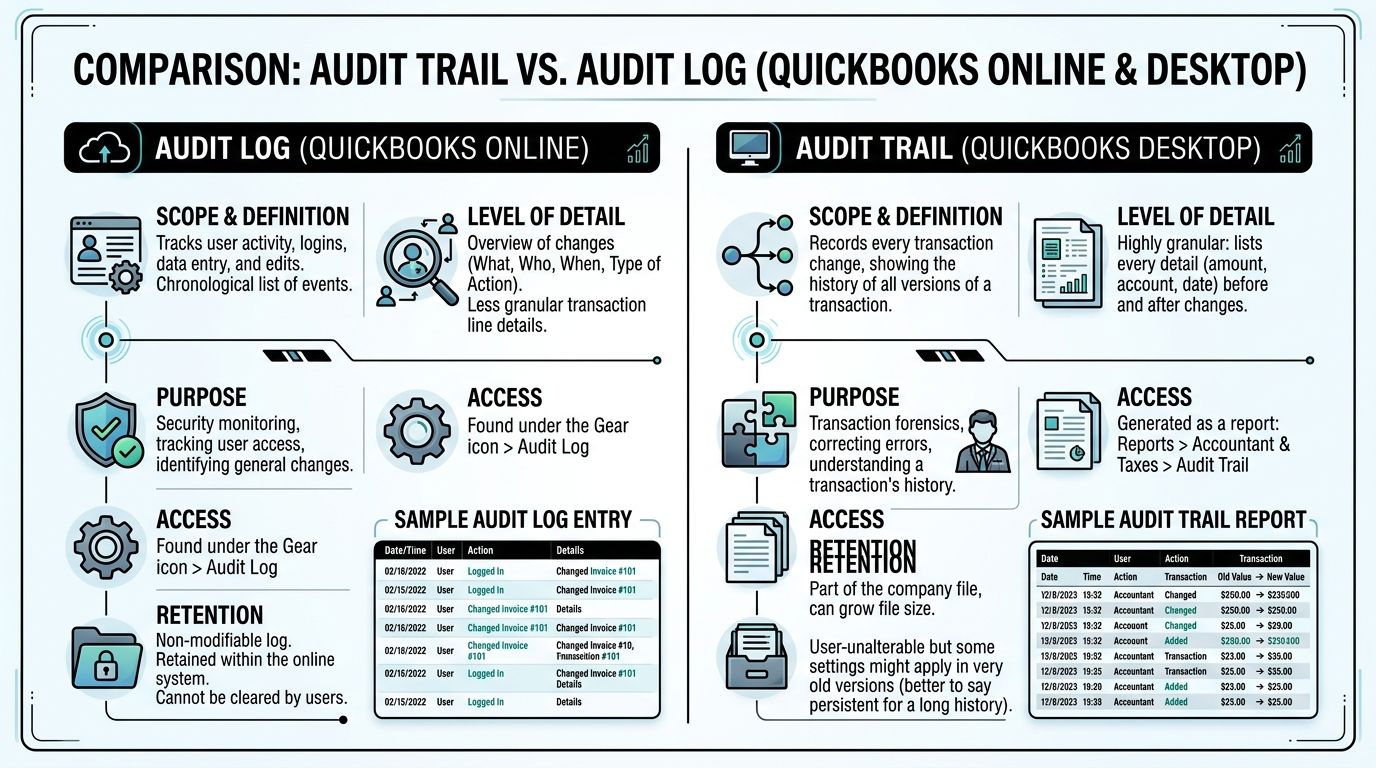
Audit Trail vs Audit Log QuickBooks Online and Desktop Differences
Many owners get tripped up at this point. They hear “audit trail” in one place and “audit log” in another and assume they’re different tools.
They’re related, but your experience depends heavily on whether you use QuickBooks Online or QuickBooks Desktop.
The simplest distinction
In everyday conversation:
- QuickBooks Online usually calls it the Audit Log
- QuickBooks Desktop usually calls it the Audit Trail
Both track changes. The difference is in storage, access, and depth of certain event tracking.
Side-by-side practical differences
According to this QuickBooks audit guidance from All Day CPA, QuickBooks Desktop file size can grow with frequent changes, while QuickBooks Online includes user tracking of changes and events, with two-year event accessibility covering sign-ins, settings, customer, supplier, employee details, and payroll.
That sounds technical, so let’s simplify it.
| Feature | QuickBooks Online | QuickBooks Desktop |
|---|---|---|
| Common name | Audit Log | Audit Trail |
| Where it lives | Cloud-based with your subscription | Inside the company file |
| Retention note | Data is retained for the life of the subscription, and detailed events are accessible for two years in the event log, as noted in the LeanLaw and All Day CPA material cited earlier | Frequent changes can contribute to file size growth |
| Non-transaction events | Tracks items such as sign-ins, settings changes, and payroll-related events | More focused on transaction history and edits inside the file |
| Maintenance concern | No file-size burden in the same way users face in Desktop | Audit history can become part of file maintenance concerns |
Why Online feels broader
QuickBooks Online often gives a wider sense of user activity.
It doesn’t just show transaction edits. It can also track non-transaction events such as sign-ins, settings changes, and modifications to customer, supplier, employee, and payroll data within its available event history. That makes Online especially useful when you’re trying to answer not just “who changed this invoice?” but also “who changed access, preferences, or supporting list data?”
For many small businesses, that broader visibility is one reason Online feels easier to supervise in a multi-user environment.
If you’re currently deciding whether to move systems, this overview on converting QuickBooks Desktop to Online can help you think through the operational side of that decision.
Why Desktop needs more housekeeping
Desktop users often love the control and familiarity of the software. That’s fair.
But the audit trail in Desktop can add weight to the company file over time. When many users make many changes, the file grows. That can turn a compliance strength into a maintenance issue if nobody monitors performance.
This doesn’t mean Desktop is flawed. It means Desktop asks for more discipline around file care.
Which version is better for forensic review
There isn’t a universal winner. There’s a better fit for the problem in front of you.
Use this lens:
- Choose Online if you want broader user event visibility and cloud access.
- Choose Desktop if your workflow depends on a local file and your team already manages file maintenance well.
- Use either carefully if multiple people touch sensitive areas like payroll, sales tax, or high-volume receivables.
A business doesn’t get better records just because it owns better software. It gets better records when each user has a separate login and someone reviews the history.
The naming difference matters less than the behavior
Business owners sometimes waste energy asking which label is correct.
The better question is: What does your version record, how long is it visible, and how do you review it consistently?
That’s what turns the audit trail in QuickBooks from a passive feature into a working control.
How to Access and Interpret Your Audit Report
Users can find the report once they know where to click. The harder part is reading it without getting overwhelmed.
The first time you open it, the screen can feel dense. That’s normal. You’re looking at the history of actions, not a polished financial statement.
How to open it in QuickBooks Online
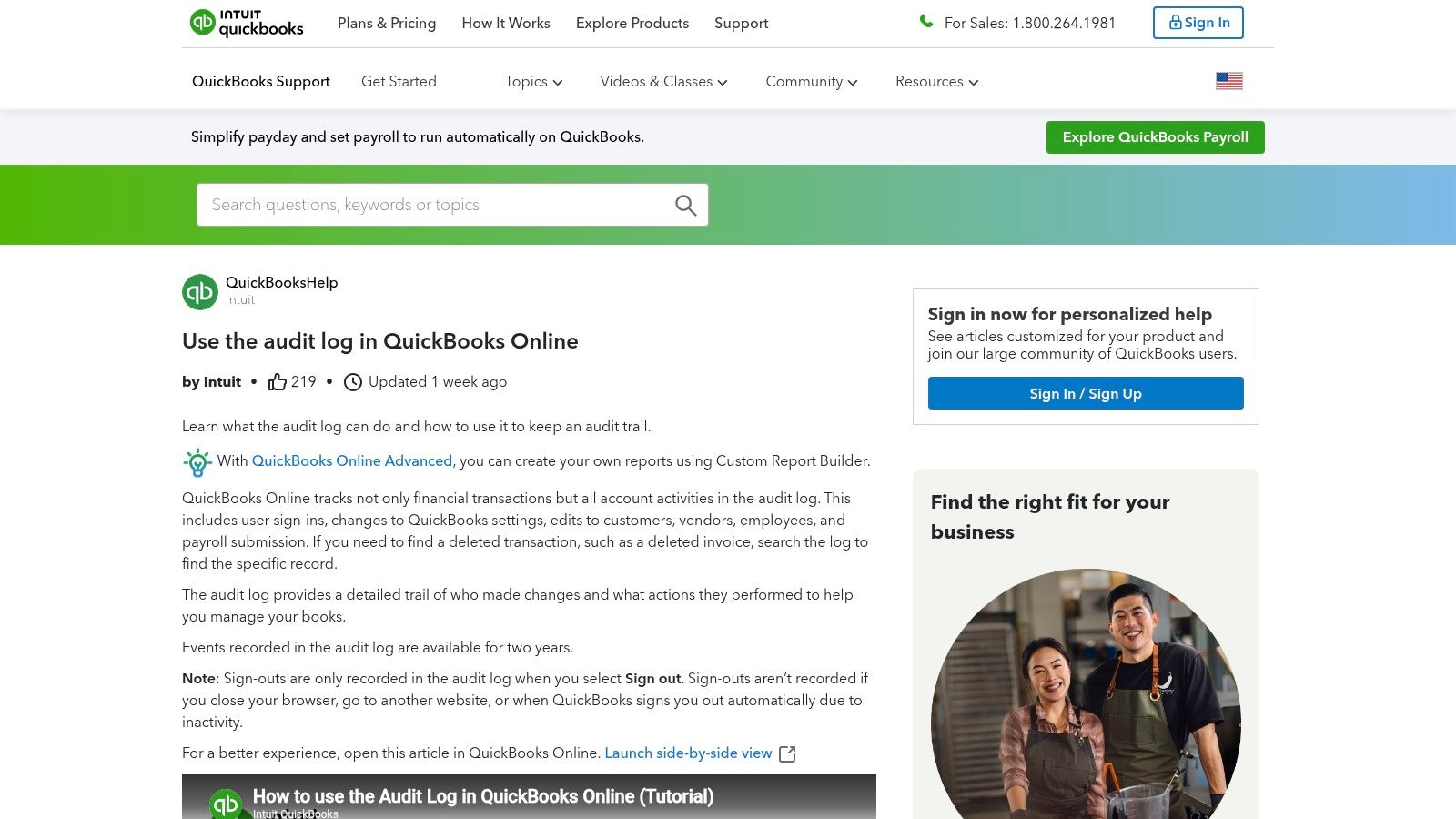
In QuickBooks Online, you generally access it from the gear icon area and open the Audit Log.
Once you’re in, don’t try to read everything at once. Start by narrowing the field.
Look first at:
- Date range if you know when the issue appeared
- User if you’re investigating one staff member or login
- Event or transaction type if you’re focused on invoices, bills, payments, payroll, or list changes
How to open it in QuickBooks Desktop
In QuickBooks Desktop, users commonly go through Reports > Accountant & Taxes > Audit Trail.
Desktop users should also think in slices. If you run the full report over a wide period, it can be noisy. Start with the account, transaction type, or user you need.
What the columns are really saying
Here’s where interpretation matters more than access.
| Column or field | What it tells you |
|---|---|
| User | Which login performed the action |
| Date and time | When the action occurred |
| Event or type | Whether the record was added, changed, deleted, or otherwise logged |
| History or prior details | What the earlier state looked like, when available |
The user field answers accountability.
The date and time field answers sequence. That’s especially important when several changes happened close together.
The event type tells you the nature of the action. A created transaction and a deleted transaction may both affect your reports, but they point to very different root causes.
The history area is where forensic reading starts. If QuickBooks shows prior values, compare them carefully. You’re trying to identify whether the change looks like a normal correction or something that bypassed process.
A simple way to read the report without getting lost
Use this order:
Find the symptom
Start with the transaction, balance, or report you know is wrong.Set a tight date range
If the problem surfaced this month, don’t begin with the full year.Review the users involved
Shared access creates confusion fast.Compare original versus later activity
Watch for changes after reconciliation or after financial review.Document what you find
Take notes before you start “fixing” entries.
If you correct a suspicious transaction before documenting the audit history, you may erase the easiest path to understanding what happened.
Where readers usually get confused
Three points trip people up most often.
Prior values don’t always read like a story
Sometimes QuickBooks shows enough to make the change obvious. Sometimes it gives fragments that require context. Don’t assume a vague entry means nothing happened.
Old changes aren’t always bad changes
A transaction edited well after entry can be suspicious. It can also reflect a legitimate accountant adjustment, a reclassification, or cleanup after a bank feed issue.
One wrong transaction can affect several reports
A single edited invoice might change revenue, accounts receivable, sales tax reporting, and reconciliation. The audit report helps identify the event, but you still need to assess the accounting ripple effect.
If your file setup is inconsistent to begin with, it helps to review core configuration before chasing symptoms. This guide on how to set up QuickBooks is useful for tightening the foundation.
Using the Audit Trail for Compliance and Fraud Detection
A clean-looking set of books can still hide bad activity.
I’ve seen owners assume that if the current balance seems reasonable, there’s nothing to worry about. But fraud and compliance problems often live in the edits, deletions, and timing of changes, not just in the final totals.

What the audit trail helps you spot
The audit trail becomes valuable when you stop reading it as a list and start reading it for patterns.
Patterns that deserve attention include:
- Late changes to transactions that were entered long ago
- Repeated deletions of invoices, payments, or bills
- Activity by the wrong user in areas they normally don’t handle
- Changes made right before reporting deadlines or tax filings
- Edits to reconciled transactions without a clear note or approval trail
None of those patterns prove fraud by themselves. They do justify a closer look.
A simple story that shows how this works
A business owner notices payroll cash is tighter than expected. The current reports don’t immediately explain it.
The owner reviews the audit history and finds that a payment had been deleted. The record shows who did it and when. That lets the team restore the transaction before the issue cascades into payroll or vendor problems.
That example matters because it shows what the audit trail does best. It shortens the distance between confusion and explanation.
Why this matters for compliance
Compliance isn’t only about filing on time. It’s also about proving that your records are reliable.
According to LeanLaw’s discussion of QuickBooks Online audit trail and law firm compliance, 30% of audited law firms were found non-compliant in 2023, and firms using the audit trail reported a 70% reduction in monthly reconciliation time, 50% faster audit preparation, and a 90% decrease in discrepancy investigations.
Those figures come from a law-firm context, but the lesson applies broadly. Better visibility into changes makes books easier to defend.
How to use it like a fraud-prevention tool
You don’t need to become a forensic accountant to make this useful.
Start with a routine:
- Review deletions regularly because deleted items often hide the biggest surprises
- Scan for old edits to transactions that should have been final
- Match user access to job roles so unusual activity stands out
- Export unusual periods when you need deeper review or a file for your accountant
- Preserve notes and backup support if you think a tax or legal issue may follow
For owners who want a broader primer on behavioral warning signs, this article on spotting financial fraud adds practical context beyond QuickBooks itself.
The strongest audit defense usually isn’t a perfect set of books. It’s a believable, traceable history that explains how the books changed and why.
What a good audit trail review sounds like
It sounds like this:
“Why was this edited after reconciliation?”
“Why did this user touch payroll?”
“Why were three invoices deleted in the same week?”
Those are useful questions because they focus on behavior, timing, and process. They move you away from guessing and toward evidence.
Advanced Troubleshooting for Audit Trail Issues
The audit trail is powerful, but it’s not magic.
That’s the part many tutorials skip. They show where the report lives, but they don’t explain what to do when the report crashes, omits a transaction you expected to see, or gives you an answer that’s technically true but practically incomplete.
Common problems users run into
According to Intuit community discussion summarized around audit trail reporting issues, a major gap in existing guidance involves audit trail reports that crash or omit transactions, especially in narrow date-range searches. The same discussion also highlights a recurring forensic issue: shared user IDs can hide accountability, and users often end up exporting data to Excel because native filtering isn’t enough for pattern analysis.
That lines up with what bookkeepers run into in real life. The report may exist, but it may not answer the question cleanly.
What to do when the report seems incomplete
Start with the boring explanations first.
- Widen the date range because narrow filters can miss the path that led to the visible result
- Check transaction type filters since the item may be logged under a different category than you expect
- Review related entries because the change may appear as part of another action, not as a standalone event
- Test user-specific filters carefully if several people touched the same workflow
Then move to the practical workaround. Export the report and analyze it outside QuickBooks.
Excel often becomes the primary investigation tool. You can sort by user, transaction type, or modified date more flexibly than inside the native report.
Shared IDs create weak evidence
If two or three staff members use the same login, the audit trail loses one of its biggest strengths.
You may still know that someone changed a bill or deleted a payment. But you won’t know which person did it. Forensic review becomes inference instead of proof.
That’s why separate user access matters so much. The software can only document actions at the login level.
Indirect edits can look suspicious when they aren’t
Another source of confusion is the “indirect edit.”
A transaction might appear changed because of a later reconciliation adjustment, accountant correction, or connected workflow event. To a business owner scanning the log, that can look alarming.
It may be legitimate. It may not. The key is to compare the timing of the change with the business reason for the change.
Workarounds that help
When the audit trail gets messy, use a process like this:
Export before making corrections
Preserve the raw history first.Build a review sheet in Excel
Sort by user, date entered, and date modified.Flag old transactions changed recently
Those often deserve explanation.Separate deletions from edits
They carry different risk.Match suspicious entries to supporting documents
Invoices, bank records, emails, and approvals matter.
If reconciliation problems are part of the mess, tightening that process first often reduces false alarms. This resource on bank account reconciliation can help clean up the underlying workflow.
Some audit trail problems aren’t accounting problems. They’re process problems showing up through accounting software.
When to Contact Allied Tax Advisors for Help
There’s a point where self-service review stops being efficient.
If you’ve found one mistaken vendor bill, you can probably handle it internally. If you’ve uncovered repeated deletions, unexplained edits to reconciled periods, or activity tied to tax-sensitive accounts, the stakes change.
Professional help makes sense when:
- You suspect fraud but can’t prove what happened
- An IRS or state audit is active and you need defensible records
- Shared logins or missing context make the history hard to interpret
- Large cleanup is required after months of changes
- Payroll, sales tax, crypto, or rental property records are involved and the accounting impact is broader than one transaction
A CPA or tax resolution team doesn’t just read the log. They connect it to filings, reconciliations, supporting documents, and risk exposure.
That matters because the audit trail tells you what happened in QuickBooks. It doesn’t automatically tell you what to fix first, what to preserve for defense, or what consequences the issue may have on tax filings and financial statements.
When the issue is sensitive, document what you found, stop making unnecessary edits, and get a professional review before the file changes again.
Frequently Asked Questions about the QuickBooks Audit Trail
Can the audit trail in QuickBooks be turned off
In modern QuickBooks, no. The audit trail is treated as a permanent record and isn’t meant to be disabled or deleted. That’s part of what gives it compliance value.
Is Audit Trail the same as Audit Log
Usually, yes in practical terms. QuickBooks Desktop commonly uses the term Audit Trail. QuickBooks Online commonly uses Audit Log. The names differ by product, but both refer to change tracking and user activity history.
Does it always show exactly what changed
Not always.
According to Intuit’s audit log help discussion on limitations, one under-discussed limitation is that the audit trail may not show the precise field-by-field difference users expect. That can push accountants and reviewers to use external tools for deeper forensic work.
Can third-party apps create blind spots
Yes, that can happen.
The same Intuit discussion highlights concerns around unlogged bulk actions from third-party apps like SaasAnt, which can create blind spots. That means the audit trail is important, but it shouldn’t be your only source of truth when you’re reviewing high-risk changes.
What’s the best habit for owners who don’t want surprises
Review the audit history regularly, keep separate user logins for every person, and investigate unusual deletions or old edits early. The best time to read the audit trail is before a problem becomes an emergency.
If your QuickBooks history reveals missing transactions, suspicious edits, reconciliation problems, or records you need to defend in front of the IRS or a state agency, Allied Tax Advisors can help you sort fact from noise, protect your documentation, and turn a confusing audit trail into a clear action plan.